How to use ForgeRank AI

Pick the entry point that matches what you're actually trying to do — you don't have to generate anything to use ForgeRank. The 4-dimension evaluation method is the same one behind every score on this site.

What are you trying to do?

Check a draft before I publish it Paste any article — yours, an AI-generated one, or a competitor's — and get a Content Quality Score on the four dimensions, plus separate AI-tone, evidence and publishing-readiness checks. Score a draft free → No signup · 1 free analysis/day Write something new Generate a draft for one of 8 platforms, scored by the same gate as it's delivered, with a publish pack and a readiness check. Below the pass line it regenerates free. Open the workspace → 10 free · no card Find something worth writing about Browse the trend hub for angles that currently have momentum, then take one straight into generation. Topic momentum only — not search volume. Browse trends →

The walkthrough below covers the generation path — pick it only if that's the one you chose. How the check works · What 29 scored drafts revealed · A real scored report.

1

Pick a platform & format

Pick the platform you're publishing for: Google/Blog, X, LinkedIn, YouTube, Instagram, TikTok, Facebook, or Reddit. Each has a format menu tuned to that platform's rules:

  • Google / Blog → article formats: standard, listicle, how-to, comparison/review, or pillar (3,000+ words)
  • X → single tweet (≤280 chars), thread, or poll
  • LinkedIn → short post, long-form article, or carousel
  • YouTube → Shorts, 5–15 min video, or 20+ min deep dive — each with a timestamped script
  • Instagram → feed caption, Reels caption, carousel, or story sequence
  • TikTok → short or long script, or photo carousel
  • Facebook → Reels caption
  • Reddit → community-native text post or tutorial
2

Enter a topic & generate

Type any topic or keyword (in any language — output is always in English) and hit generate. One credit per generation.

💡 Tip: Specific topics produce stronger content. Instead of "marketing", try "how to grow a newsletter in 2026".
3

Get your content + publishing pack

Every generation includes five things:

  • Main content — the article or script itself
  • Quality gate — the 4-dimension score (real information gain / specificity / source compliance / argument depth) plus the ForgeRank pass line the draft cleared, with AI-sounding phrasing cleaned before delivery
  • Publish Pack — caption, hashtags, best time to post, alt titles, comment replies & pinned comment
  • Deep Insight — why this content performs, with A/B test ideas
  • Readiness check — documented-signal checklist of what's already on-target plus quick wins
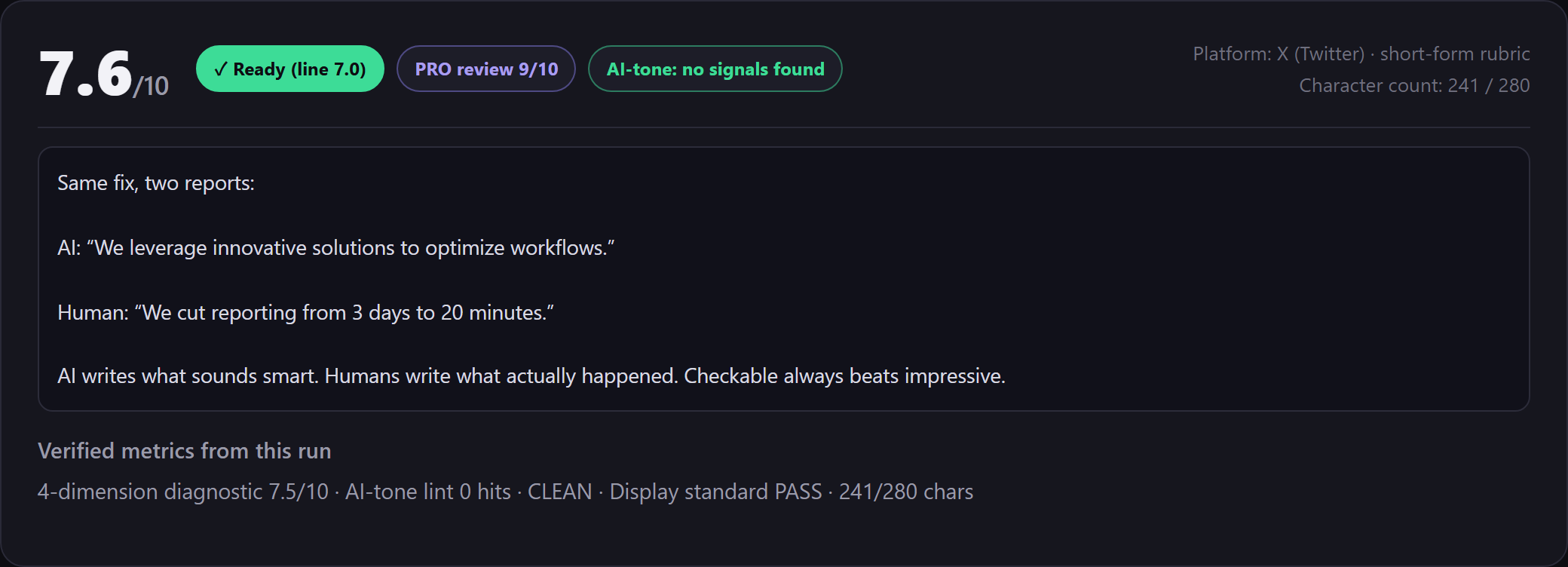
Real scored card from the same quality gate: an X draft scored 7.6/10, Ready (benchmark 7.0), no AI-tone patterns.
Real scored output. A genuine draft scored by the same gate that ships with every generation — recorded X run, final version: 7.6/10 · Ready (benchmark 7.0) · AI-Tone: no patterns. See the full 6.2 → 7.6 before/after on the real report page →
📘 Curious how this quality gate was built? The whole engine — the gates, the scoring rubric, the auto-rewrite — is documented step by step in The Book, a real SaaS built from zero in 12 days. Read the free chapters →
4

Analyze any article (scoring mode)

Switch to 🔍 Analyze at the top of the workbench and paste any article — a competitor's post, a top-performing piece, or your own draft. You get a Content Quality Score on the same 4-dimension rubric used in generation, plus:

  • Source recommendations — the sentences that would be stronger with supporting evidence (we flag where evidence may help; we do not verify facts)
  • AI-Tone patterns — machine checks run in milliseconds and list the phrasing patterns that read as machine-written, each with a suggested action
  • Publishing readiness — the checks for the context you pick (Search, LinkedIn, X …), shown as x/y passed. Local structure checks; they never change the Content Quality Score
  • Top priority — the single most actionable fix, with the exact sentence to change and what to do
  • Quality benchmark — whether the piece clears the bar for its industry (7.0–8.0 depending on vertical: strong-template 8.0 · mid 7.5–7.8 · weaker 7.0)

Then hit Generate similar to turn a winning piece into a new draft — the analyzed strengths carry over as the generation recipe.

✅ Real QC record. Our published Home & Garden guide — How to Clean a Washing Machine the Right Way — carries editorial QC 8.2/10 (ForgeRank pass line 7.5) on the same 4-dimension gate that powers the Analyzer (record: scripts/_blog_editorial_qc.json, run 2026-09-08). Re-run the published text yourself in the free Analyzer — same engine, same rubric. See the full score list, each with its run date, on our verification receipts →
💡 Cost: a full analysis uses 1 credit, the same as a generation — and it's refunded if a score can't be produced. Every new account starts with 10 free articles (no card), and the live demo on the homepage scores one article free per day. See a real run: a genuine 6.2 → 7.6 report →
💡 Tip: Benchmark competitors before you write: analyze their top post, see which structure checks it misses, and let "Generate similar" build your version with those gaps filled.
5

Copy, publish, engage

Each block has a Copy button. Post at the suggested best time, reply to comments in the first hour (replies are included for you), and pin the pinned comment.

Common questions

What's the difference between Create (Generate) and Analyze?
The workbench has two modes. Create (generate) writes a new piece from a topic — the article or script, plus Publish Pack, Deep Insight and Readiness check. Analyze scores any article you paste (a competitor's post, a top-performing piece, or your own draft) into a Content Quality Score on the same 4-dimension rubric, then adds the independent QA checks: source recommendations (which sentences would be stronger with evidence), AI-Tone patterns (with a suggested action per pattern), publishing-readiness checks for the context you pick, and an expert review with the single most actionable fix. "Generate similar" then turns a winning piece into a new draft.
What happens if I run out of credits?
The workbench stops a run and shows a ⚡ Get Credits button — top up in the app and continue. Every new account starts with 10 free articles (no card), and the homepage demo scores one article free per day. Credit packs are one-time (no subscription): Starter $4.99 / 50 credits (75 credits ≈ $0.0666 per piece on first purchase), Pro $17.99 / 200 credits, Business $39.99 / 500 credits. Credits never expire. One credit = one generation or one full analysis.
Can I regenerate a draft if I picked the wrong format?
Yes. Every draft has a ↻ Regenerate action that re-runs the same topic (older versions are kept, so you can compare). To switch the format or platform, change the selector in the workbench and hit Generate again — each run costs 1 credit. And a generation that misses the score threshold regenerates free — we only keep credits for output you actually used.
Where is my history?
The left sidebar in the workbench lists every run, newest first — searchable by keyword and filterable by platform. Generation history sits at the top; Analyze runs are grouped separately below it. Click any entry to reopen the full draft with its Publish Pack, Insight, Readiness check, and score — nothing is lost when you close the tab.
10 free articles · no card · no subscription · credits never expire